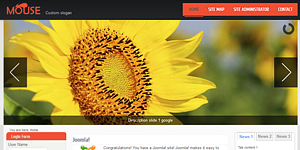
With a nice combination of dark, light and orange colors, this templates fits all kinds of websites. Improve your conversions and impress your visitors with this nice design, which is for free!
Live demo -
37 thoughts on “Joomla 2.5 Template Free”
Hi,
I am using this template execpt i can not change the logo or the slideshow pictures. I have read everything but still can’t get it to work.
Replace the template’s files, that should work. Look up their locations in the browser, then change them!
What I can’t figure out is how to make a module display inside a tab. A assign it to “tab1” module position, and enable them in settings. They show up displaying nothing but text =(
Dear Chris,
Go to your root folder of project and selectthe template folder, and select slidshow folder, and save your new image in the same size and same name.
so it’s easy. you must only upload/owerwrite files(used cpanel file manager):
slideshow – yourdomain/templates/mouse/slideshow/1.jpg -> x.jpg
logo – yourdomain/templates/mouse/images/logo.png
I have been struggling with css, trying to figure out how to change the background to dark gray (same color as the header/nav). I want to change the sides, as well as the main content area.
Good morning
Thanks for this template!
I have a problem, The slideshow worked perfectly a week ago, then It stopped. I would like to know if there is any component or module that could damage the slideshow, because it is not working properly!
Hello!
I’ve had a similar issue, I think you should check jQuery and other Javascript libraries your components may use.
Have a look at what this may be caused by: http://api.jquery.com/jQuery.noConflict/
Hi, I’ve also got this problem but I am not used to coding js so I really don’t understand what the link above is meant to tell me… what plugin could I use to solve this?I’m really stuck!
Thanks
You can change the colour in the CSS for the template. If that doesn’t work, I discovered that a lot of the background elements are images so you will need to download them and change in an image editor. I wanted to change my entire site black so I had to use a combination of changing the CSS and recolouring the background images.
hello,
thanks for great template. It’s work perfect, but one thing i can’t manage. I would like to have the descriptions in each slides like normal text, not links (URL’s). How can i change it? Thank’s
I love this template! Its looks great. But only one thing: using IE9. The dropdown menu-items in the mainmenu/menuload disappear on mouse-over. How to fix this?
Thanks for reply.
Theo
Hi; I am using this template and it gives me a minor problem: the dropdownmenus in the mainmenu (position menuload) disappear on mouse-over. But onlu when using browser IE; Firefox and Chrome are acting well. How can I solve this problem? Please help.
* In the module, the checkbox is ON to indicate “always show submenus”
Under the modules there is a slideshow.php file. Just add or remove the img links to add or remove the number of images in the slideshow. I know this is almost a year later, but maybe it’ll help someone else.
Hi
Is it possible to put a module inside a tab, I see the tabs appear in the module list but if i select one the module does not appear inside the tab.
You actually make it seem so easy along with your presentation but I find this matter to be actually one thing that I feel I would never understand. It sort of feels too complex and very broad for me. I’m looking forward for your next submit, I’ll attempt to get the cling of it!
I am really loving the theme/design of your weblog.
Do you ever run into any web browser compatibility problems?
A few of my blog readers have complained about my blog not operating correctly in Explorer but looks great in
Firefox. Do you have any tips to help fix this problem?
It is a great template, but I do have issues with the alignment of the tables. Can somebody point me how to change the vertical alignment of a table cell or full table? [TinyMCEditor shows the layout correct, but once published it is gone).
Also the border of the table can not be set to 0…
Thanks for any tips in advance !
I’m using this template for my website and it works really cool.. I love the design and navigation. I’m a newbie and it is easy to use. Thanks for the template.
I do like this template, its nice & clean :). Im a bit of a joomla newbie & having some small issues with the contact page. The contact details (address, tel, email etc) are formatted pretty strangely, each line is spaced out further than the previous line & it looks odd.
I pretty much want to get the entire contact page formatted exactly like the beez_20 template (also so the address is not only on a single line).
Does anyone know which file I need to edit? I managed to edit the css file to get rid of the annoying resizing of the contact form message box but this has me a bit stumped :p.
Hi,
I am using this template execpt i can not change the logo or the slideshow pictures. I have read everything but still can’t get it to work.
Replace the template’s files, that should work. Look up their locations in the browser, then change them!
What I can’t figure out is how to make a module display inside a tab. A assign it to “tab1” module position, and enable them in settings. They show up displaying nothing but text =(
replace the file content of -Templates>mouse>modules>j-tabscontent
as shown below:
News
Links
Feeds
Chris, I wish I read your post first. Same problem here. Wonder if anyone here will reply?
Dear Chris,
Go to your root folder of project and selectthe template folder, and select slidshow folder, and save your new image in the same size and same name.
I going upload to subdomain and teach how to change it and after i’ll type you.
so it’s easy. you must only upload/owerwrite files(used cpanel file manager):
slideshow – yourdomain/templates/mouse/slideshow/1.jpg -> x.jpg
logo – yourdomain/templates/mouse/images/logo.png
Firstly, thank you for this great template !!
I have been struggling with css, trying to figure out how to change the background to dark gray (same color as the header/nav). I want to change the sides, as well as the main content area.
Please, any tips for me?!
thank you!!
-Jess
I’m using this template. Thanks!!
I want to replace the slideshow included in this template for other. how could I do??
How could I replace the slideshow included in this template by another one?
Good morning
Thanks for this template!
I have a problem, The slideshow worked perfectly a week ago, then It stopped. I would like to know if there is any component or module that could damage the slideshow, because it is not working properly!
Hello!
I’ve had a similar issue, I think you should check jQuery and other Javascript libraries your components may use.
Have a look at what this may be caused by: http://api.jquery.com/jQuery.noConflict/
Thanks for your help, finally I decided to install a jquery plugin, and It solved m,y problem
Hi, I’ve also got this problem but I am not used to coding js so I really don’t understand what the link above is meant to tell me… what plugin could I use to solve this?I’m really stuck!
Thanks
Good evening, I can not render the menu.
I changed the visibility under management template but nothing changes.
What do you recommend?
How could I insert two captions in the slideshow?
Thanks
Dear techies..
in this template, i cannot get drop down button in menus, only at home page, but i get it only in inner pages of selected.
In menu module options check whether it’s told to always display all subitems. Look for a checkbox.
Hi,
Can someone please tell me how to change the color of the header (black/dark grey)
Thank you
You can change the colour in the CSS for the template. If that doesn’t work, I discovered that a lot of the background elements are images so you will need to download them and change in an image editor. I wanted to change my entire site black so I had to use a combination of changing the CSS and recolouring the background images.
Hope that helps
hello,
thanks for great template. It’s work perfect, but one thing i can’t manage. I would like to have the descriptions in each slides like normal text, not links (URL’s). How can i change it? Thank’s
How do I make the images of the slideshow link out to pages of the site?
I love this template! Its looks great. But only one thing: using IE9. The dropdown menu-items in the mainmenu/menuload disappear on mouse-over. How to fix this?
Thanks for reply.
Theo
Hi; I am using this template and it gives me a minor problem: the dropdownmenus in the mainmenu (position menuload) disappear on mouse-over. But onlu when using browser IE; Firefox and Chrome are acting well. How can I solve this problem? Please help.
* In the module, the checkbox is ON to indicate “always show submenus”
How modify news1 module, and news 2 news 3. Thank you.
Necesito quitar lo de News 1 / News 2 y News 3.
Para quitarlo simplemente entra a Extensiones->Gestor de Plantillas, entra en la plantilla y en la opción “Sidebar Tabs” selecciona “Hide”.
Congratulations, it’s a great Template, but how can I change the number of slideshows?? I wish It had 3, or even 1, not 4. How can I change it??
Under the modules there is a slideshow.php file. Just add or remove the img links to add or remove the number of images in the slideshow. I know this is almost a year later, but maybe it’ll help someone else.
It’s amazing designed for me to have a web page, which is helpful in support of my know-how. thanks admin
Hi
Is it possible to put a module inside a tab, I see the tabs appear in the module list but if i select one the module does not appear inside the tab.
Wow, this paragraph is fastidious, my sister is analyzing these kinds of things, so I am going to let know her.
You actually make it seem so easy along with your presentation but I find this matter to be actually one thing that I feel I would never understand. It sort of feels too complex and very broad for me. I’m looking forward for your next submit, I’ll attempt to get the cling of it!
I am really loving the theme/design of your weblog.
Do you ever run into any web browser compatibility problems?
A few of my blog readers have complained about my blog not operating correctly in Explorer but looks great in
Firefox. Do you have any tips to help fix this problem?
It is a great template, but I do have issues with the alignment of the tables. Can somebody point me how to change the vertical alignment of a table cell or full table? [TinyMCEditor shows the layout correct, but once published it is gone).
Also the border of the table can not be set to 0…
Thanks for any tips in advance !
I’m using this template for my website and it works really cool.. I love the design and navigation. I’m a newbie and it is easy to use. Thanks for the template.
I do like this template, its nice & clean :). Im a bit of a joomla newbie & having some small issues with the contact page. The contact details (address, tel, email etc) are formatted pretty strangely, each line is spaced out further than the previous line & it looks odd.
I pretty much want to get the entire contact page formatted exactly like the beez_20 template (also so the address is not only on a single line).
Does anyone know which file I need to edit? I managed to edit the css file to get rid of the annoying resizing of the contact form message box but this has me a bit stumped :p.